How to Check Glo Balance : USSD Codes Directory
Running out of airtime in the middle of a call or a download is easy to avoid once you know the right code. Glo uses a small set of short USSD codes for balances, recharge and data, and each one works on any phone, with or without an internet connection. This directory lists every code you need, what it does and how to use it, so you can check your balance in seconds.
GLO AIRTIME BALANCE CODE
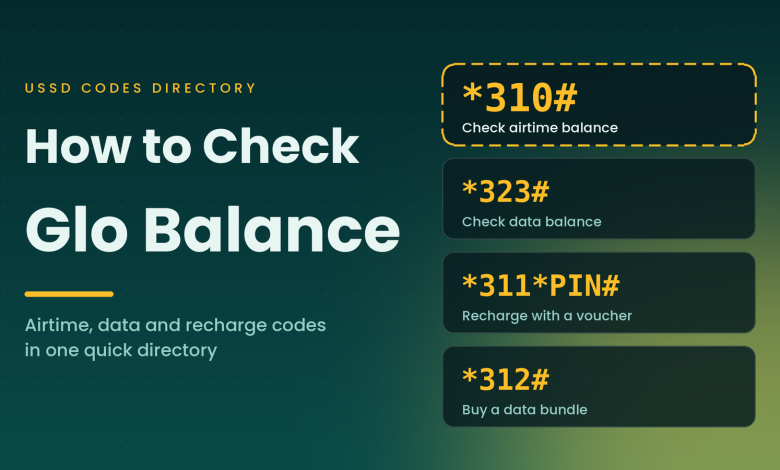
*310#
Dial and press call to see your balance
How to check your Glo airtime balance
Your airtime balance is the credit left on your line for calls, texts and data bought from your main account. Checking it takes four simple steps.
- Open the dialer on the phone that holds your Glo SIM.
- Dial *310# and press the call button.
- Wait a few seconds while the network responds.
- Read the pop-up message showing your balance, then tap OK.
The code is free and works day and night. If an older code you used in the past returns an error, switch to *310#, the current standard code for checking airtime on Glo.
How to check your Glo data balance
To see how much data is left on your active bundle, dial *323# and press call. The reply shows the remaining data and when the bundle expires, so you know whether to top up before it runs out. Check this code before a large download, a video call or a long streaming session, and you will not be caught out halfway through.
Glo USSD codes directory
Save this table or take a screenshot for quick use. Every code below is dialed from the phone that holds your Glo SIM, followed by the call button.
| CODE | WHAT IT DOES |
|---|---|
| *310# | Check airtime balance |
| *323# | Check data balance |
| *311*PIN# | Recharge airtime with a voucher PIN |
| *312# | Buy a data bundle |
| *303# | Borrow airtime or data when your balance is low |
For the recharge code, replace PIN with the digits printed on your recharge card and keep the stars and the hash sign exactly as shown.
Other ways to check your Glo balance
USSD is the fastest option, but you have more than one route.
- Glo mobile app: Sign in with your Glo number to view your airtime and data balance on one screen.
- Customer care: Call Glo customer care from your Glo line and ask an agent to confirm your balance.
Tips for an accurate balance check
- Dial from the Glo SIM. On a dual SIM phone, choose the Glo line when the phone asks which SIM to use.
- Type the code exactly, with the star at the start and the hash sign at the end, and no spaces.
- If the network is busy, wait a minute and dial again.
- Check your balance before and after a recharge to confirm that the credit arrived.
- Save *310# and *323# as contacts named Glo Airtime and Glo Data, so one tap dials them.
If your balance looks lower than expected, remember that calls, texts, data usage and active subscriptions all draw from the same airtime. Dial *310# again after your activity ends. If the figure still looks wrong, contact customer care and tell them the time you checked.
With these codes saved on your phone, you can check your Glo airtime and data balance whenever you need to, then recharge or buy a bundle before you run out.