USSD Codes for Jaiz Bank plc: The Complete Directory
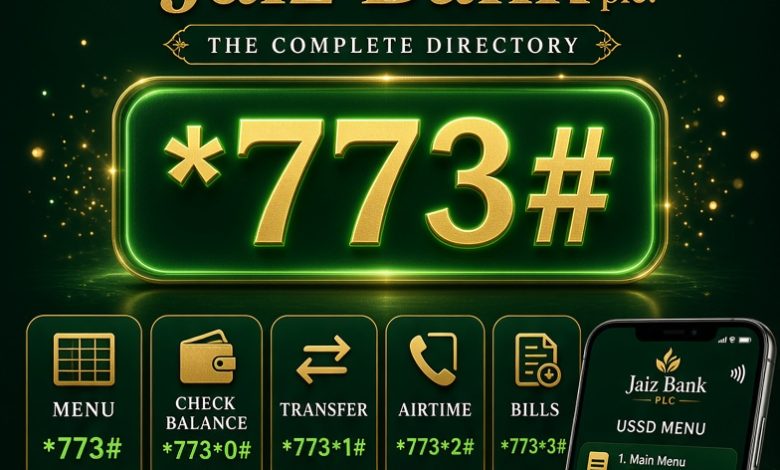
Jaiz Bank Plc provides USSD banking to customers who want to access essential financial services directly from their mobile phones. With the service, customers can use a registered phone number to access banking options without opening the mobile banking application or connecting to the internet.
The main Jaiz Bank USSD code is *773#. It provides access to the bank’s mobile banking menu, where customers can find available options for account enquiries, money transfers, airtime purchases and other supported services. This guide explains how to use the code and where to find the correct transaction options.
Whether you want to check your account balance, transfer money, purchase airtime or access other banking services, this directory explains the available USSD routes and important precautions to follow when using Jaiz Bank mobile banking.
What Is the Jaiz Bank USSD Code?
The main Jaiz Bank USSD code is:
JAIZ BANK MAIN USSD CODE
*773#
Dial from the phone number registered with your Jaiz Bank account.
Jaiz Bank’s *773# service gives customers access to banking options through a simple menu displayed on their phones. It is useful for people who want to perform basic transactions without using mobile data.
Jaiz Bank is a Nigerian non-interest financial institution. Its banking services are structured around ethical and Sharia-compliant banking principles.
Complete Jaiz Bank USSD Codes Directory
The table below provides a practical directory of Jaiz Bank USSD banking services. The main banking code is *773#. For transactions where a direct shortcut is not confirmed, use the main menu and follow the instructions displayed on your phone.
| Banking Service | USSD Code or Method |
|---|---|
| Main Banking Menu | *773# |
| Check Account Balance | Dial *773# and select balance enquiry |
| Transfer to Jaiz Bank Account | Dial *773# and select transfers |
| Transfer to Other Banks | Dial *773# and select other-bank transfer |
| Buy Airtime for Yourself | Dial *773# and select airtime |
| Buy Airtime for Another Number | Dial *773# and select third-party airtime |
| Buy Mobile Data | Dial *773# and check the data option |
| Pay Bills | Dial *773# and select bill payment |
| Open an Account | Dial *773# and check account opening |
| Account Security | Use the available security options in the USSD menu |
| BVN Enquiry | *565*0# (BVN industry shortcode) |
Important: Not every banking option has a separately confirmed direct shortcode. The main *773# menu is the recommended starting point. Follow the options actually displayed by Jaiz Bank rather than relying on an unverified shortcut.
How to Activate Jaiz Bank USSD Banking
Customers who have not used Jaiz Bank USSD banking before may need to complete registration before carrying out transactions.
Follow these steps:
- Insert the SIM card containing the mobile number registered with your Jaiz Bank account.
- Open your phone dialler.
- Dial *773#.
- Choose the registration or activation option if it appears.
- Provide the account information requested by the system.
- Follow the instructions to complete verification.
- Create or confirm your transaction PIN if requested.
- Complete the registration process and wait for the confirmation message.
Registration instructions may vary depending on your account and the options currently available on the bank’s platform. If the registration option does not appear, contact Jaiz Bank customer service for assistance.
Jaiz Bank USSD Code for Checking Account Balance
You can use Jaiz Bank’s USSD service to check your account balance without visiting a banking hall or logging into the mobile application.
To check your balance:
- Dial *773# using your registered phone number.
- Select the account balance or balance enquiry option.
- Provide the required account details or PIN if requested.
- Follow the instructions displayed on your screen.
- Wait for the balance information or confirmation message.
Always protect your transaction PIN. Do not disclose it to anyone claiming to be a bank representative.
Jaiz Bank USSD Transfer Code
Jaiz Bank customers can use the *773# banking menu to transfer money. The transfer service allows customers to send money to eligible Jaiz Bank accounts and accounts held with other Nigerian banks.
To begin a transfer:
- Dial *773#.
- Select the transfer option.
- Choose whether you are transferring to another Jaiz Bank account or another bank.
- Enter the recipient’s account number.
- Select the recipient’s bank when required.
- Enter the amount you want to transfer.
- Check the recipient’s displayed name carefully.
- Follow the instructions to authorise the transaction with your PIN.
Do not approve a transfer if the beneficiary’s name or transaction details are incorrect. Cancel the transaction and start again if necessary.
Transfer to Another Jaiz Bank Account
To send money to another Jaiz Bank customer, open the transfer menu and select the Jaiz Bank transfer option. Enter the recipient’s account number and the amount you want to send.
Confirm the recipient’s name before authorising the payment. The transaction will be processed after successful verification and authorisation.
Transfer from Jaiz Bank to Other Banks
To transfer money to another Nigerian bank, select the other-bank transfer option from the *773# menu. Choose the recipient’s bank, provide the account number and enter the transfer amount.
Review the beneficiary information and any displayed transaction charges before confirming. The available transfer limits and charges may depend on the bank’s current rules and your account status.
Jaiz Bank USSD Code for Buying Airtime
Jaiz Bank customers can use USSD banking to purchase airtime directly from their accounts. This can be useful when you need to recharge your mobile line but do not have internet access.
To purchase airtime:
- Dial *773#.
- Select the airtime or recharge option.
- Choose the option for your own number or another phone number.
- Enter the recharge amount.
- Check the phone number and amount displayed.
- Confirm the transaction as instructed.
Make sure the selected phone number is correct before approving the recharge. Airtime sent to the wrong number may be difficult to recover.
Buying Airtime for Another Person
If you want to recharge a family member’s, friend’s or colleague’s phone, select the third-party airtime option from the USSD menu.
Enter the recipient’s mobile number and the amount you want to purchase. Check the details carefully before completing the transaction.
Jaiz Bank USSD Code for Buying Data
Customers can check the available data purchase options through Jaiz Bank’s USSD banking menu. This service may allow you to purchase data bundles for your own mobile number or another eligible number, depending on the options provided.
To purchase data:
- Dial *773#.
- Look for the data purchase option.
- Select your mobile network if requested.
- Choose an available data bundle.
- Confirm the phone number and amount.
- Authorise the payment as instructed.
Available networks, bundles and prices may change. Check the options displayed during the transaction before confirming payment.
Jaiz Bank USSD Code for Paying Bills
Jaiz Bank’s USSD banking menu may provide access to supported bill payment services. These services allow customers to pay selected bills through their mobile phones.
Depending on the available menu options, supported payment categories may include:
- Electricity bills.
- Television subscriptions.
- Internet and communication services.
- Other supported utility payments.
To make a bill payment, dial *773#, select the bill payment option and follow the instructions. Choose the correct service provider, enter the required customer information and confirm the amount before authorising payment.
Not all billers or payment categories may be available at every time. Check the live menu for the services currently supported.
Jaiz Bank USSD Code for Opening an Account
People interested in becoming Jaiz Bank customers can check whether account opening is available through the *773# USSD menu.
To get started:
- Dial *773#.
- Look for the account opening option.
- Select the appropriate account type if prompted.
- Provide the requested personal information.
- Complete any identity verification required by the bank.
- Follow the instructions until the process is completed.
Account opening requirements may depend on the account category. The bank may request additional information or documents to complete your registration.
Jaiz Bank USSD Code for Checking BVN
Your Bank Verification Number (BVN) is an important identity reference used in Nigeria’s banking system. If you need to retrieve your BVN, the general Nigerian banking shortcode is:
*565*0#
BVN enquiry shortcode.
Dial the code from the phone number linked to your BVN registration and follow the instructions. A service charge may apply. This is an industry BVN enquiry code, not a Jaiz Bank-specific USSD shortcut.
How to Block or Secure Your Jaiz Bank Account
If your mobile phone is stolen, your SIM card is compromised or you suspect unauthorised access to your account, take immediate action to protect your money.
Jaiz Bank-related guides circulate emergency USSD instructions involving *773*911#. However, the exact blocking procedure should be confirmed with the bank before relying on a direct shortcut.
For urgent assistance:
- Contact Jaiz Bank through its official customer service channel.
- Explain that your phone or account may be compromised.
- Request assistance with restricting unauthorised transactions.
- Follow the bank’s identity verification process.
- Contact your mobile network provider if your SIM card has been stolen or taken over.
Do not share your PIN, password, one-time password or other security credentials with anyone. Use the bank’s official website to obtain its current contact information.
Which Mobile Networks Support Jaiz Bank USSD?
Jaiz Bank’s USSD service is intended for customers using mobile phones on Nigerian networks. The major networks include:
- MTN Nigeria.
- Airtel Nigeria.
- Globacom (Glo).
- 9mobile.
To access the service, use the mobile number registered with your Jaiz Bank account. If the code does not work, check that your SIM is active and that your network can process USSD requests.
Does Jaiz Bank USSD Banking Require Internet Access?
No. USSD banking is designed to work without a mobile internet connection. You can access the banking menu using your phone’s dialler, provided your mobile network is available.
This makes the service useful for customers who use basic phones or have limited access to mobile data. However, a working mobile network connection is still necessary to send and receive USSD requests.
Can I Use Jaiz Bank USSD on Any Phone?
USSD banking does not require a smartphone. Customers can generally access the service using a compatible basic mobile phone or smartphone.
The important requirement is that you use an active mobile number registered with your Jaiz Bank account and follow the instructions displayed by the bank’s USSD platform.
Jaiz Bank USSD Charges and Transaction Limits
USSD banking transactions may attract charges depending on the type of transaction and applicable banking and mobile network rules.
Charges and limits can change. Before completing a transaction, check the fee and maximum amount displayed on your phone. Your account category, verification status and the bank’s current transaction policies may also affect the amount you can transfer.
Do not rely on an old transfer limit or fee published in an outdated guide. The transaction confirmation screen and current bank instructions should guide your decision.
Why Is My Jaiz Bank USSD Code Not Working?
If *773# does not respond, several issues may be responsible. The problem may be related to your SIM card, mobile network, account registration or a temporary service interruption.
Try the following solutions:
1. Check Your Registered Phone Number
Make sure you are dialing the code from the phone number linked to your Jaiz Bank account.
2. Check Your Network Signal
Move to an area with better network reception and try again.
3. Restart Your Phone
Restarting your device may resolve temporary network or SIM-related problems.
4. Check Your SIM Card
Make sure your SIM card is active and can make calls or access other USSD services.
5. Contact Jaiz Bank
If the code continues to fail, contact the bank through its official customer service channels to check whether your account or USSD access needs attention.
Jaiz Bank Customer Care Contact Details
If you need assistance with USSD registration, failed transfers, account access or other banking services, contact Jaiz Bank through its official customer service channels.
Jaiz Bank Plc
Customer care: 0700 773 0000
Website: Official Jaiz Bank Website
Head office: Plot 1073 J.S. Tarka Street, Area 3, Garki, Abuja, Nigeria.
For complaints involving failed transactions or suspected fraud, provide the relevant transaction information through the bank’s official support channel. Never send your PIN or password when reporting a problem.
Safety Tips When Using Jaiz Bank USSD Banking
USSD banking makes transactions convenient, but customers should follow basic security practices to protect their accounts.
- Always dial the code from your registered mobile number.
- Never disclose your USSD transaction PIN.
- Check the recipient’s account name before approving a transfer.
- Confirm the transaction amount before entering your PIN.
- Do not approve transactions you did not initiate.
- Report a lost or stolen phone to the bank immediately.
- Avoid following USSD instructions sent by unknown individuals.
- Contact Jaiz Bank through its official channels if you notice suspicious account activity.
Frequently Asked Questions About Jaiz Bank USSD Codes
What is the main USSD code for Jaiz Bank?
The main Jaiz Bank USSD banking code is *773#. Dial it from your registered mobile number to access the available banking menu.
How do I check my Jaiz Bank account balance?
Dial *773#, select the balance enquiry option and follow the instructions displayed on your phone.
How do I transfer money from Jaiz Bank to another bank?
Dial *773#, select the transfer option for other banks, enter the beneficiary’s account details and amount, then confirm the transaction after checking the recipient’s name.
How do I buy airtime from my Jaiz Bank account?
Dial *773#, select the airtime option and follow the instructions to recharge your own number or another phone number.
Can I buy data using Jaiz Bank USSD?
Check the *773# menu for the data purchase option. If available, select your network and preferred bundle and follow the payment instructions.
Can I use Jaiz Bank USSD without internet?
Yes. USSD banking works without mobile data, although your phone must have an active mobile network connection.
Can I use Jaiz Bank USSD on MTN and Airtel?
Jaiz Bank USSD is intended for customers using Nigerian mobile networks. Use the number registered with your account and contact the bank if your network cannot access the service.
How do I open a Jaiz Bank account using USSD?
Dial *773# and check whether the account opening option is available. Follow the instructions and complete any identity verification required by the bank.
What is the Jaiz Bank customer care number?
The customer service number published on Jaiz Bank’s website is 0700 773 0000. Confirm current contact options through the bank’s official website.
What should I do if *773# is not working?
Check your network signal, confirm that you are using your registered phone number and try again. If the problem continues, contact Jaiz Bank customer service.
Is *565*0# a Jaiz Bank BVN code?
*565*0# is the general Nigerian BVN enquiry shortcode. It is not a Jaiz Bank-specific banking code.
Does Jaiz Bank have a mobile banking application?
Yes. Jaiz Bank provides JaizMobile for customers who prefer app-based banking. Visit the official bank website to find its current mobile banking information.
Final Thoughts on Jaiz Bank USSD Codes
Jaiz Bank’s *773# USSD banking service gives customers a convenient way to access banking options directly from their mobile phones. It is useful for checking account information, transferring money, purchasing airtime and accessing other services available through the bank’s menu.
For the most reliable experience, dial the main code from your registered phone number and follow the instructions displayed on your screen. Always confirm transaction details, check applicable charges and protect your PIN when using mobile banking.
For additional assistance, visit the official Jaiz Bank website or contact its customer service team.