What Is the Moneyfield Microfinance Bank USSD Codes Nigeria? *5684# Guide for 2026
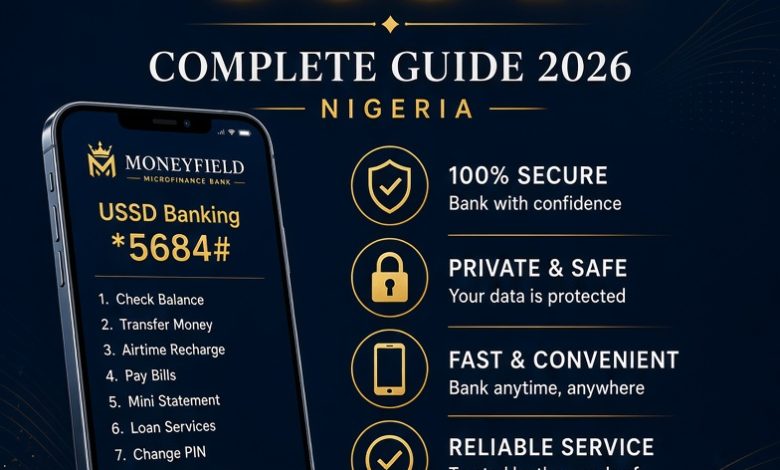
Accessing banking services should not always require an internet connection or a smartphone. Moneyfield Microfinance Bank provides USSD banking to help customers access banking services directly from their mobile phones. This service is particularly useful for people who want a convenient way to manage their accounts without depending entirely on mobile applications or internet banking.
The official Moneyfield Microfinance Bank USSD banking code is *5684#. Customers can dial this short code to access the bank’s USSD platform and follow the instructions displayed on their phones. This guide explains the Moneyfield Microfinance Bank USSD code in Nigeria, how to access the service, important precautions, and what customers should know about using USSD banking in 2026.
Whether you want to understand how the service works, access your banking menu, or learn what to do when a transaction fails, this article provides practical information about Moneyfield Microfinance Bank USSD banking.
1. What Is the Moneyfield Microfinance Bank USSD Code?
The Moneyfield Microfinance Bank USSD code is *5684#. It is a short banking code that allows customers to access the bank’s USSD banking service through their mobile phone dialler.
USSD means Unstructured Supplementary Service Data. It is a communication technology that allows mobile phone users to interact with service providers by entering short codes. Instead of opening an internet-based application, customers dial a designated code and receive instructions directly on their phone screens.
Moneyfield customers can use the USSD platform to access the banking options made available by the bank. The available services and transaction requirements depend on the bank’s current USSD menu and the customer’s account eligibility.
The important code to remember is:
MONEYFIELD MICROFINANCE BANK USSD CODE
*5684#
Dial from your mobile phone to access the USSD service.
2. How to Activate Moneyfield Microfinance Bank USSD Banking
Customers who want to use Moneyfield USSD banking should begin by confirming that their mobile telephone number is properly registered with their bank account.
USSD banking generally uses the customer’s registered telephone number to identify and authenticate account access. Therefore, using an unrelated telephone number may prevent you from accessing the service.
To get started, follow these steps:
- Insert the SIM card linked to your Moneyfield Microfinance Bank account into your mobile phone.
- Open your phone’s dialler.
- Enter *5684#.
- Press the call button.
- Wait for the USSD menu to appear.
- Read the available instructions carefully.
- Select the banking service you want to access.
- Complete any authentication or registration requirements displayed by the bank.
If the service requests additional verification, provide only the information required through the legitimate banking session. Never disclose your confidential banking PIN to another person.
3. What Can You Do With the Moneyfield USSD Code?
The Moneyfield USSD platform is designed to provide customers with convenient access to banking services through a mobile phone.
Depending on the services currently enabled on the platform, customers may find options relating to account management, banking transactions, and other available financial services.
However, customers should distinguish between services generally offered through USSD banking and specific services confirmed to be available on Moneyfield’s platform. Not every microfinance bank provides identical USSD features.
To know the exact services available on your account, dial *5684# and check the options displayed on the screen.
4. Moneyfield Microfinance Bank USSD Code for Account Services
Account management is an important part of everyday banking. Customers frequently need to access information about their accounts without visiting a physical branch.
Moneyfield’s USSD banking service provides a direct channel for accessing its available mobile banking options.
When you dial the official code, examine the menu for account-related services. Depending on the options enabled, you may be able to access account information or other account management functions.
If you cannot find a particular option, contact the bank to confirm whether the service is supported through USSD or requires another banking channel.
5. Can You Transfer Money With Moneyfield USSD Banking?
Money transfers are among the most frequently requested services in mobile banking. Customers use electronic transfers to send money to individuals, businesses, and other bank accounts.
If Moneyfield has enabled funds transfer on your USSD menu, you should be able to identify the transfer option after dialing the official code.
Before completing a transfer, carefully check the recipient’s account details and the amount you intend to send. Never approve a transaction if the displayed information is incorrect.
We recommend checking the current transfer instructions directly through the bank’s USSD menu or customer support. Do not rely on unverified shortcut combinations or transaction formats.
After a successful transfer, retain the transaction confirmation message for your records.
6. How to Check Your Moneyfield Account Balance
Knowing your account balance helps you monitor your money and plan your daily expenses.
Some Nigerian banks provide a dedicated balance enquiry option through their USSD platforms. However, customers should not assume that another bank’s balance enquiry shortcut will work with Moneyfield.
To check whether balance enquiry is available:
- Dial *5684# using your registered telephone number.
- Wait for the banking menu.
- Look for an account balance or account information option.
- Select the appropriate option if available.
- Follow the displayed instructions.
If balance enquiry is not displayed, use the bank’s other approved banking channels or contact customer support.
7. Can You Buy Airtime With Moneyfield USSD Code?
Mobile airtime is essential for making telephone calls and staying connected. Many Nigerian banks offer airtime purchase through USSD banking.
However, the availability of airtime purchase depends on the features supported by each bank’s platform.
Moneyfield customers should dial *5684# and check whether airtime purchase appears among the available services.
If the option is available, follow the displayed instructions. Check the telephone number, network, and recharge amount before confirming the transaction.
If airtime purchase is not available through the USSD menu, you can use another supported recharge channel.
8. Moneyfield Microfinance Bank USSD Code for Data Purchase
Mobile data allows customers to access the internet, communicate with family members, and use digital banking applications.
Some financial institutions provide data purchase through their USSD services. The availability of this feature on Moneyfield’s platform should be confirmed through the current menu.
To check, dial *5684# and examine the available options.
If a data purchase option is provided, select your preferred network and follow the instructions displayed. Always verify the telephone number and data bundle before confirming payment.
Where the option is unavailable, customers can purchase data through their mobile network provider or another supported payment channel.
9. Does Moneyfield USSD Banking Require Internet Access?
No. One of the main advantages of USSD banking is that it does not require an internet connection.
Customers can access USSD services using a basic mobile phone or a smartphone without opening a browser or connecting to mobile data.
This makes the service useful for customers who have limited internet access or prefer not to use mobile banking applications for every transaction.
However, your mobile network must be available. A weak network signal, temporary service interruption, or network congestion can prevent a USSD session from completing successfully.
10. Which Networks Support Moneyfield USSD Banking?
USSD banking operates through mobile telecommunications networks. In Nigeria, mobile phone users commonly access USSD services through networks such as MTN, Airtel, Glo, and T2.
Whether a particular network can access Moneyfield’s USSD platform depends on the bank’s network arrangements and service availability.
If you experience difficulties using your preferred network, contact Moneyfield to confirm supported networks and whether there is a temporary service interruption.
Also ensure that the telephone number you are using is registered with your Moneyfield account.
11. Is Moneyfield Microfinance Bank USSD Banking Available on Every Phone?
USSD technology does not require an advanced smartphone. It can work on compatible basic mobile phones that support the network services needed to establish a USSD session.
This is one reason USSD banking remains important in Nigeria, where not every customer uses a smartphone or has consistent access to mobile internet.
As long as your phone can make calls, has an active SIM card, and receives the necessary mobile network signal, you may be able to access the USSD platform.
Remember that your telephone number must also meet the bank’s registration requirements.
12. Why Is the Moneyfield USSD Code Not Working?
There are several reasons why a customer may experience difficulties when dialing *5684#.
Some problems are related to the mobile network, while others may involve account registration, service availability, or temporary technical interruptions.
Common causes include:
- Wrong telephone number: You may be dialing from a SIM card that is not registered with your Moneyfield account.
- Network problems: Poor mobile network coverage can interrupt USSD communication.
- Temporary system maintenance: The bank’s USSD platform may occasionally become unavailable during maintenance.
- Incorrect code: Entering an incorrect USSD combination can prevent the session from opening.
- SIM card problems: A damaged or inactive SIM card may affect access.
- Session timeout: Taking too long to respond to a menu prompt may cause the session to expire.
To resolve the problem, confirm that you are using the correct code, check your network connection, and try again after a short period.
If the problem continues, contact the bank directly.
13. What Should You Do When a Moneyfield USSD Transaction Fails?
A failed USSD transaction can be frustrating, especially when you are trying to complete an urgent payment.
The first thing to do is determine whether the transaction was actually unsuccessful. Sometimes, a USSD session may close unexpectedly even though the bank is still processing the request.
Follow these precautions:
- Do not immediately repeat a transaction involving a potentially debited amount.
- Check your account balance through an approved banking channel.
- Look for an SMS or transaction notification.
- Record the transaction time and amount.
- Contact Moneyfield customer support if the transaction remains unresolved.
Provide the bank with the relevant transaction information so that its support team can investigate the issue.
Avoid making repeated payments until you have confirmed the status of the original transaction.
14. Is Moneyfield Microfinance Bank USSD Banking Safe?
USSD banking provides a convenient way to access financial services, but customers must take responsibility for protecting their banking information.
Always use the official Moneyfield USSD code and keep your banking PIN confidential.
Never share your PIN, passwords, or sensitive account information with strangers. Bank employees should not ask you to disclose your confidential transaction PIN.
Other important safety practices include:
- Keep your mobile phone protected with a screen lock.
- Do not allow strangers to use your banking session.
- Check transaction details before approving payments.
- Do not follow suspicious instructions received through unsolicited messages.
- Report lost or stolen SIM cards immediately.
- Contact the bank if you notice an unfamiliar transaction.
These precautions can reduce the risk of unauthorized access and fraudulent transactions.
15. What Happens If You Lose Your Registered SIM Card?
Your registered telephone number plays an important role in accessing mobile banking services.
If your SIM card is lost or stolen, contact your mobile network provider as soon as possible to request a SIM replacement or block the affected line.
You should also inform Moneyfield Microfinance Bank so that the bank can advise you on protecting your account and updating your registered telephone number where necessary.
Do not ignore a lost SIM card, particularly if it is connected to your bank account and other financial services.
Taking immediate action helps reduce the possibility of unauthorized access.
16. Does Moneyfield USSD Banking Work Outside Lagos?
Moneyfield Microfinance Bank has its operational roots in Lagos, but customers should not assume that USSD banking is restricted to the location of a physical branch.
USSD banking is accessed through mobile telecommunications networks rather than by visiting a banking office.
Customers who are outside Lagos can try accessing the service by dialing the official code from their registered telephone numbers.
Actual availability may depend on network coverage, account status, and the bank’s service arrangements.
If you are travelling or living in another Nigerian state, contact Moneyfield if you encounter problems accessing the service.
17. About Moneyfield Microfinance Bank Nigeria
Moneyfield Microfinance Bank Limited is a Nigerian financial institution established to provide financial services to individuals, small businesses, and micro-enterprises.
The bank was licensed by the Central Bank of Nigeria in 2010 and commenced business operations in February 2011.
Moneyfield operates as a subsidiary of Capitalfield Investment Group Limited.
Its financial services are designed to support customers who need banking, savings, investment, and financing solutions.
Like other microfinance banks, Moneyfield plays a role in improving access to financial services, particularly for small businesses and individuals who need accessible financial products.
The bank’s digital banking services, including USSD banking, provide additional ways for customers to interact with their accounts without always visiting a physical branch.
18. Moneyfield Microfinance Bank Customer Care Contact
If you experience difficulties using the Moneyfield USSD code, you can contact the bank through its customer support channels.
Customers can use the following published contact details:
Moneyfield Microfinance Bank
Phone: 0700 024 8632
Alternative phone: 0909 842 2992
WhatsApp: 0706 611 8294
Head office: 105 Awolowo Road, Ikoyi, Lagos, Nigeria.
When contacting customer support, explain the problem clearly. If you are reporting a failed transaction, provide the transaction amount, date, time, and reference information where available.
Never send your confidential banking PIN or password through an ordinary message or disclose it during a support conversation.
19. Moneyfield Microfinance Bank USSD Code and Mobile Banking
USSD banking and mobile banking applications provide different ways to access financial services.
USSD banking is particularly useful when you do not have mobile internet access. It allows you to interact with the bank through a short code and a text-based menu.
Mobile banking applications generally provide a graphical interface and may offer additional features, depending on the bank’s application.
Moneyfield customers should use the banking channels officially supported by the institution. If you want to download a mobile banking application, confirm its authenticity before installing it.
Do not download financial applications from unknown websites or share your account details with unofficial applications.
20. Important Things to Know Before Using Moneyfield USSD Banking
Before accessing the Moneyfield USSD platform, there are several important things every customer should understand.
- The official Moneyfield USSD code is *5684#.
- Use the telephone number registered with your bank account.
- USSD banking does not require mobile internet access.
- A compatible mobile network connection is necessary.
- Follow the instructions displayed by the bank.
- Transaction charges, if applicable, should be checked through the bank’s current terms.
- Do not assume that every service offered by another bank is available on Moneyfield’s platform.
- Never share your confidential banking PIN.
- Contact customer support when a transaction remains unresolved.
Understanding these basic requirements can help you use the service more confidently and avoid common mistakes.
21. Frequently Asked Questions About Moneyfield Microfinance Bank USSD Code
What is the official Moneyfield Microfinance Bank USSD code?
The official Moneyfield Microfinance Bank USSD code is *5684#. Dial this code from your mobile phone to access the bank’s USSD banking platform.
How do I activate Moneyfield USSD banking?
Dial *5684# using the telephone number registered with your Moneyfield account and follow the instructions displayed on your phone.
Can I use Moneyfield USSD banking without internet?
Yes. USSD banking works without mobile internet. However, your phone must have an active mobile network connection to establish a session.
Can I transfer money using *5684#?
Dial the code and check whether funds transfer is available in the current banking menu. Follow the bank’s instructions and confirm recipient details before approving any transaction.
Can I check my Moneyfield account balance with USSD?
Check the current *5684# menu for an account balance enquiry option. If the option is unavailable, contact the bank or use another approved banking channel.
Does Moneyfield USSD banking work on small phones?
Yes. USSD technology is designed to work on compatible basic mobile phones as well as smartphones. An internet connection is not required.
Why is *5684# not opening on my phone?
Possible reasons include poor network coverage, an unregistered telephone number, temporary service interruptions, or SIM card problems. Check your network and try again.
Can I use Moneyfield USSD banking with another person’s phone?
USSD banking access is generally associated with the telephone number registered to the account. For security reasons, use your registered SIM card and avoid allowing other people to access your banking session.
Is Moneyfield Microfinance Bank a licensed microfinance bank?
Moneyfield Microfinance Bank states that it received its Central Bank of Nigeria licence in 2010 and commenced operations in February 2011.
How can I contact Moneyfield Microfinance Bank?
You can contact the bank through 0700 024 8632 or 0909 842 2992. Its published WhatsApp contact is 0706 611 8294.
22. Final Thoughts on Moneyfield Microfinance Bank USSD Code for 2026
Moneyfield Microfinance Bank’s USSD banking service provides customers with another way to access banking services through their mobile phones. The official USSD code is *5684#, which customers can dial to access the bank’s available USSD menu.
The service is useful because it does not require an internet connection or an advanced smartphone. Customers can use compatible mobile phones to access the banking platform, provided they meet the bank’s registration and network requirements.
Before completing any transaction, always follow the instructions displayed on the official USSD platform. Check transaction details carefully, protect your PIN, and contact the bank if you encounter an unresolved problem.
For customers looking for the Moneyfield Microfinance Bank USSD code in Nigeria in 2026, the main code to remember is *5684#.