MTN Uganda Mobile Money USSD Code Guide: Send, Withdraw, Pay and Save
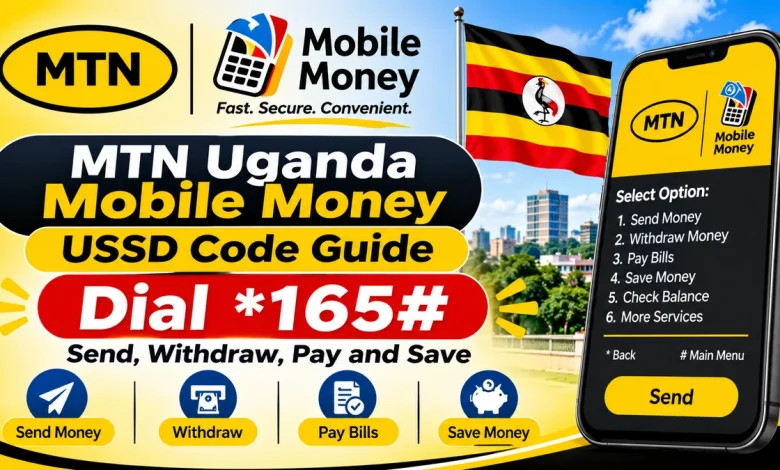
The MTN Uganda Mobile Money USSD code is *165#. MTN customers can dial this shortcode from their registered mobile phones to access MoMo services, including sending money, withdrawing cash, paying bills, purchasing airtime, transferring funds to bank accounts and accessing savings and loan products.
MTN Mobile Money, commonly called MTN MoMo, allows registered customers in Uganda to carry out financial transactions without visiting a bank. The USSD service works on compatible mobile phones without requiring an internet connection, making it useful for people who use basic phones as well as smartphones.
This guide explains how to use the MTN Uganda Mobile Money shortcode, the available transaction codes and the steps for completing common MoMo transactions safely.
What Is the MTN Uganda Mobile Money USSD Code?
MTN MoMo Main USSD Code
*165#
Dial this shortcode on your MTN Uganda line to open the Mobile Money menu.
The main MTN MoMo code is *165#. Once you dial it, a menu appears on your screen with different transaction options. Select the service you want and follow the instructions displayed.
You can use the shortcode to access services such as:
- Sending money to another mobile money user.
- Sending money to someone without a mobile money account.
- Withdrawing cash through an authorised agent.
- Buying airtime and data.
- Paying utility bills and other services.
- Making merchant payments using MoMoPay.
- Transferring money to bank accounts.
- Sending and receiving international remittances.
- Accessing eligible savings and loan products.
- Checking account information and managing your wallet.
MTN Uganda Mobile Money USSD Codes
Although *165# is the main shortcode, MTN provides additional direct codes for selected services. The following table lists useful published access codes.
| Service | USSD Code |
|---|---|
| MTN Mobile Money main menu | *165# |
| Send money to Africa | *165*1*2# |
| Send money outside Africa | *165*1*3# |
| Send money to a bank account | *165*6# |
| Pay bills and services | *165*4# |
| MoMoPay merchant services | *165*3# |
| School fees payment | *165*4*3# |
| ClinicPesa registration | *165*5#, then select ClinicPesa |
Some services are accessed through a menu rather than a separate direct shortcode. For withdrawals, balance enquiries, airtime purchases and savings products, follow the relevant option displayed after dialing *165#. Menu layouts can change, so use the labels shown on your phone.
How to Register for MTN Mobile Money in Uganda
You need an active MTN Uganda SIM card and a registered Mobile Money account before you can use the wallet for transactions.
MTN provides Mobile Money registration through its service points. Registration is free according to MTN’s customer information.
Registration steps
- Obtain an MTN Uganda SIM card registered with your identification details.
- Visit an MTN service centre or authorised Mobile Money registration point.
- Request Mobile Money registration.
- Complete the registration requirements and provide the requested identification documents.
- Follow the instructions to activate your Mobile Money account.
- Set up your secret Mobile Money PIN.
- Dial *165# to access the service after activation.
MTN states that customers can contact its support team on 122 or 100 for information about Mobile Money registration.
How to Send Money Using MTN Mobile Money
MTN MoMo allows customers to send money to another mobile money user. The recipient can be on MTN or another supported mobile money network, depending on the available service.
To send money, dial *165# and select the Send Money option.
MTN MOMO SEND MONEY
*165#
Select Send Money from the main menu.
Steps to send money
- Dial *165# on your MTN line.
- Select Send Money.
- Choose the option for sending to a mobile money user.
- Enter the recipient’s phone number.
- Enter the amount you want to send.
- Enter the reason for the transaction if requested.
- Check the recipient details and transaction amount.
- Enter your Mobile Money PIN to confirm.
- Wait for the transaction confirmation message.
MTN also allows customers to send money to a person who does not have a registered Mobile Money account. In this case, the sender creates a four-digit secret code during the transaction. The recipient uses the information provided to collect the money through an eligible Mobile Money agent.
Never share your personal Mobile Money PIN. The four-digit collection code used for a non-registered recipient is different from your wallet PIN.
How to Withdraw Money from MTN MoMo
You can withdraw money from your MTN Mobile Money wallet through an authorised MTN MoMo agent. The withdrawal option is available from the main *165# menu.
Withdrawal steps
- Visit an authorised MTN Mobile Money agent.
- Tell the agent that you want to withdraw money.
- Dial *165# on your phone.
- Select the Withdraw Money or Cash Out option displayed.
- Follow the prompts and enter the agent details requested.
- Enter the amount you want to withdraw.
- Review the transaction information and charges.
- Confirm the transaction using your Mobile Money PIN.
- Wait for the confirmation message before collecting your cash.
Make sure the transaction details on your phone match the withdrawal you requested. Do not disclose your PIN to the agent or anyone else.
Withdrawal charges depend on the amount and the applicable MTN tariff. Check the displayed charges before approving the transaction.
How to Buy Airtime Using MTN Mobile Money
MTN customers can purchase airtime directly from their Mobile Money wallets. The service can be used to top up the MTN number linked to the wallet or another eligible mobile number.
Steps to buy airtime
- Dial *165#.
- Select Buy Airtime.
- Choose whether to buy airtime for your own number or another number.
- Enter the amount.
- Enter the recipient’s phone number if required.
- Review the number and amount.
- Confirm using your Mobile Money PIN.
- Wait for the confirmation message.
MTN’s published instructions state that buying airtime using Mobile Money is free of charge. Check the current transaction prompt for the applicable terms.
How to Pay Bills Using MTN Mobile Money
MTN Mobile Money supports payments for different goods and services, including utilities, television subscriptions, school fees, taxes and other participating billers.
The published direct access code for bill payments is *165*4#.
BILL PAYMENT CODE
*165*4#
Bill payment steps
- Dial *165*4#.
- Select the type of bill or service you want to pay.
- Choose the relevant biller.
- Enter the required payment reference or account number.
- Enter the amount.
- Check the displayed payment details.
- Confirm the payment using your Mobile Money PIN.
- Keep the confirmation message for your records.
Available billers and payment options depend on MTN’s current service partnerships. Always check the name of the service provider and the payment reference before confirming.
How to Pay School Fees with MTN MoMo
MTN Mobile Money allows parents and guardians to pay school fees through supported school payment platforms. The service provides options for schools registered on the relevant payment systems.
The published school fees shortcode is *165*4*3#.
School fees payment steps
- Dial *165*4*3#.
- Select the appropriate school fees payment platform.
- Choose the payment option.
- Enter the school registration code or student identification number supplied by the school.
- Confirm that the displayed school or student details are correct.
- Enter the amount you want to pay.
- Follow the remaining instructions and confirm the payment.
- Keep the SMS confirmation and present it to the school where required.
MTN lists different payment channels, including Primary-to-University, FlexiPay, School Pay, Bridge International and Magezi Harvest. The correct option depends on the school and the payment arrangement it supports.
How to Pay Merchants Using MTN MoMoPay
MTN MoMoPay is a merchant payment service that allows customers to pay participating businesses using Mobile Money. It is useful for paying for goods and services without carrying cash.
MTN publishes *165*3# as the access code for MoMoPay.
MOMOPAY MERCHANT SERVICES
*165*3#
Steps to make a merchant payment
- Dial *165*3#.
- Enter the merchant code provided by the business.
- Enter the payment amount.
- Check the merchant information and amount.
- Confirm the transaction using your Mobile Money PIN.
- Wait for the payment confirmation message.
Only pay using the merchant details supplied by the business you are dealing with. Check the merchant name and amount before confirming the payment.
How to Transfer MTN MoMo Money to a Bank Account
MTN Uganda allows customers to transfer funds from their Mobile Money wallets to participating bank accounts. This service is useful when you want to move money from your wallet into a conventional bank account.
The direct access code published by MTN for sending Mobile Money to a bank account is *165*6#.
MOMO TO BANK TRANSFER
*165*6#
Bank transfer steps
- Dial *165*6#.
- Select Send to Bank Account.
- Choose the receiving bank.
- Select the bank account option.
- Enter the beneficiary’s bank account number.
- Enter the amount in Uganda Shillings.
- Review the bank and account details.
- Enter your Mobile Money PIN to confirm.
- Wait for the transaction confirmation message.
The available banks and transfer conditions depend on MTN’s current partnerships. Check the bank name and account details carefully before authorising a transfer.
How to Send International Money with MTN Mobile Money
MTN MoMo Remittance allows registered customers in Uganda to send money to supported destinations outside the country. Customers can also receive international remittances directly into their Mobile Money accounts.
MTN publishes separate direct codes for sending money to African countries and destinations outside Africa.
SEND TO AFRICA
*165*1*2#
REST OF THE WORLD
*165*1*3#
Steps to send international money
- Dial the code for the destination region.
- Select the recipient’s country.
- Enter the recipient’s mobile number or required bank details.
- Enter the amount in Uganda Shillings where requested.
- Review the recipient’s details and exchange information.
- Enter your Mobile Money PIN to authorise the transfer.
- Wait for the confirmation message.
MTN lists destinations across East Africa, Southern Africa, West Africa, Central Africa, Asia and Europe. Supported countries and payment options may differ depending on the destination and remittance partner.
Receiving money from abroad
Registered MTN MoMo customers can receive international remittances from supported countries and participating transfer providers. MTN states that incoming international funds are credited to the customer’s MoMo account in Uganda Shillings (UGX).
MTN’s international remittance information states that receiving money from abroad is free of charge. Sending fees and limits depend on the transaction and destination, so check the current tariff before transferring.
How to Access Savings and Loans on MTN MoMo
MTN Uganda provides access to savings and credit products through its Mobile Money platform and partner services. Eligible customers may find products such as MoKash, MoPesa, MoSente, XtraCash and MoMo Advance.
These products have different eligibility requirements, fees, repayment periods and loan limits. Availability is not guaranteed for every Mobile Money customer.
MoKash
MoKash is a savings and loan service offered through MTN Mobile Money in partnership with a financial institution. Eligible customers can access its available savings and borrowing options through the MoMo menu.
Other savings and loan products
MTN’s published Mobile Money information also lists products such as MoPesa, MoSente, XtraCash and MoMo Advance. The available loan amount, access fee, interest and repayment period differ by product.
To check which services are available to you:
- Dial *165#.
- Open the Savings and Loans or Financial Services section displayed in the menu.
- Select the product you want to explore.
- Read the eligibility requirements and terms.
- Check the fees, repayment period and applicable charges before accepting an offer.
Do not borrow money without understanding the total repayment amount and due date. A loan offer displayed on your phone does not mean that borrowing is compulsory.
How to Check Your MTN Mobile Money Balance
You can check your wallet balance through the MTN MoMo menu. The balance enquiry option is available from the account or wallet management section.
- Dial *165#.
- Open the My Account or account management section.
- Select the balance enquiry option displayed.
- Enter your Mobile Money PIN if requested.
- Read the balance information shown on your screen or received by SMS.
The precise menu position may change. Follow the balance enquiry label displayed on your phone rather than relying on an old menu number.
How to Keep Your MTN MoMo Account Safe
Your Mobile Money PIN protects the funds in your wallet. Anyone who obtains your PIN may attempt to carry out transactions without your permission. Use the following precautions to protect your account.
- Never share your Mobile Money PIN with an agent, caller or stranger.
- Do not disclose one-time passwords or confidential transaction information.
- Check the recipient’s name and number before sending money.
- Review the transaction amount and charges before confirming.
- Do not approve transactions you did not initiate.
- Use authorised MTN Mobile Money agents.
- Contact MTN immediately if your phone or SIM card is lost.
- Keep your transaction confirmation messages.
MTN will not need you to reveal your secret PIN to investigate a transaction. Be cautious of callers who claim that they need your PIN to reverse a payment or unlock your account.
What to Do If You Send Money to the Wrong Number
If you accidentally transfer money to the wrong recipient, contact MTN customer support as soon as possible. Provide the transaction reference, amount, date and recipient number when reporting the problem.
You can also check the account management and transaction reversal options available through the *165# menu.
A reversal is not guaranteed. It depends on the transaction status, the circumstances and the applicable investigation process. Do not send additional money to someone who claims they can reverse the transaction for you.
MTN Uganda Mobile Money Customer Care
If you have problems sending money, withdrawing cash, paying bills or accessing your wallet, contact MTN Uganda through its customer support channels.
Customer care: 100
Mobile Money information: 122
WhatsApp: 0772 123 100
Email: [email protected]
Official website: www.mtn.co.ug
When contacting customer care about a transaction, have the transaction reference and relevant details ready. Never include your Mobile Money PIN in an email or support request.
Frequently Asked Questions
1. What is the MTN Uganda Mobile Money USSD code?
The main MTN Uganda Mobile Money USSD code is *165#. Dial it to access the MoMo menu.
2. How do I send money using MTN MoMo?
Dial *165#, select Send Money, enter the recipient’s number and amount, review the details and confirm with your Mobile Money PIN.
3. How do I withdraw money from MTN Mobile Money?
Visit an authorised MTN MoMo agent, dial *165# and select the withdrawal option. Follow the instructions and confirm the transaction on your phone.
4. What is the MTN MoMo bank transfer code?
The direct code for sending money from MTN MoMo to a bank account is *165*6#.
5. What is the MTN Uganda bill payment code?
The published bill payment code is *165*4#. It provides access to payments for supported utilities and other services.
6. What is the MTN MoMoPay code?
The published MoMoPay code is *165*3#. Customers can use it to pay participating merchants.
7. Can I send money from Uganda to another country using MTN MoMo?
Yes. MTN supports international transfers to participating destinations. The published codes include *165*1*2# for Africa and *165*1*3# for destinations outside Africa.
8. Can I receive money from abroad into MTN MoMo?
Yes. Registered customers can receive international remittances through supported transfer providers. Incoming funds are credited to the MoMo wallet in Uganda Shillings.
9. Does MTN Mobile Money provide savings and loans?
Yes. MTN lists savings and credit products such as MoKash, MoPesa, MoSente, XtraCash and MoMo Advance. Eligibility, fees and repayment conditions vary.
10. Can I use MTN MoMo without internet access?
Yes. The USSD service works through *165# and does not require mobile data. The MyMTN application requires an internet connection.
11. What is the MTN Uganda customer care number?
You can call 100 for customer support. MTN also lists 122 for Mobile Money registration enquiries.
Conclusion
The MTN Uganda Mobile Money USSD code is *165#. It gives registered customers access to everyday financial services, including sending money, withdrawing cash, buying airtime, paying bills, making merchant payments and accessing savings and loans.
For selected services, MTN also provides direct codes such as *165*6# for bank transfers, *165*4# for bill payments, *165*3# for MoMoPay and *165*1*2# for sending money to Africa.
Before confirming any transaction, check the recipient’s details, amount and applicable charges. Keep your Mobile Money PIN private and use MTN’s official customer support channels if you experience a problem.