complete new guide on UBA USSD Code *919#
Complete guide • United Bank For Africa (UBA)
complete new guide on UBA USSD Code *919#
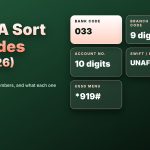
If you bank with United Bank for Africa, you already hold one of the most useful tools in Nigerian banking: a short code that turns any phone into a bank branch. The code is *919#. It needs no data, no app download and no smartphone. This guide walks through every part of it, from the first dial to the last confirmation, in plain words, so you can use it with confidence and avoid the mistakes that cost people money.
The short version
Dial *919# from the phone number linked to your UBA account, create a 4-digit PIN on your first use, then use the menu or a shortcut to transfer, buy airtime or check your balance.
1. What USSD banking actually is
USSD stands for Unstructured Supplementary Service Data. In everyday terms, it is a live text conversation between your phone and your bank, carried by your mobile network rather than the internet. You dial a code that starts with a star and ends with a hash, a menu appears on the screen, and you reply with numbers. Because nothing is downloaded, it works on the cheapest handset and in places where data is slow or absent.
That is why USSD matters so much in Nigeria. A customer in a town with a weak data signal can still send money, top up airtime or check a balance. A customer whose smartphone battery is dead can borrow any phone, as long as the SIM is the one linked to the account. The code is the same for everyone: *919#.
2. What you need before you start
◆ An active UBA account.
◆ The mobile number linked to that account. USSD is tied to the number, so a different SIM will not work.
◆ A little airtime or a working network line, because each session uses your network.
◆ A 4-digit PIN that you will create on your first dial and must keep private.
If you are not sure which number is linked to your account, check with UBA before you try. Dialling from the wrong number is the most common reason people think the code is broken.
3. How to activate it, step by step
Dial *919#
Use the registered number and make sure you have a signal.
Read the first prompt
The menu will ask you to continue with setup if this is your first time.
Create a 4-digit PIN
Choose numbers that are not your birth year, phone number or a simple run such as 1234.
Confirm the PIN
Type it again exactly. A mismatch means you will need to start again.
Wait for the confirmation
You should see a message that setup is complete. After that, the menu opens each time you dial.
Activation works without a debit card, which makes it one of the easiest ways to get started. Keep your PIN in your head, not in your notes app or in a text message.
4. The main codes at a glance
| What you want | Code to dial |
|---|---|
| Open the main menu | *919# |
| Send to a UBA account | *919*3*Account Number*Amount# |
| Send to another bank | *919*4*Account Number*Amount# |
| Airtime for yourself | *919*Amount# |
| Airtime for another number | *919*Phone Number*Amount# |
| Check balance | *919*00# |
In every shortcut, the capitalised words are placeholders. Replace them with the real account number, phone number or amount, and type the stars and hashes exactly as shown, with no spaces. Menu numbers and the order of details can change when the bank updates the service, so if a shortcut does not respond, go back to *919# and follow the menu, which always matches your account.
5. How to transfer money
Transfers are the reason most people use USSD. There are two main cases.
To another UBA account. Dial *919*3*Account Number*Amount#. Replace the account number with the 10-digit number of the person you want to pay and the amount with the naira figure. Follow the prompts, check the account name, then enter your PIN.
To an account in another bank. Dial *919*4*Account Number*Amount# and follow the prompts. You may be asked to choose the bank before you confirm. Again, check the name that appears before you approve.
The menu also lists options for sending to some microfinance banks and wallets. If you do not see the destination you want in a shortcut, use the menu path from *919#.
A safe-transfer routine you can repeat every time
◆ Check your balance first, so the transfer does not fail halfway.
◆ Type the account number twice in your head before you submit it.
◆ Read the account name on the screen. If it is not the person you mean to pay, cancel.
◆ Enter your PIN only at the final confirmation step.
◆ Keep the debit alert as proof. If the receiver says nothing arrived, the alert and the time help UBA trace it.
6. How to buy airtime
Airtime for your own line is the simplest job on the menu. Dial *919*Amount#, replace Amount with the naira value, and confirm with your PIN. To top up someone else, dial *919*Phone Number*Amount# with their number and the amount. The service supports the main networks, MTN, Airtel, Glo and 9mobile, and the airtime is charged to your account.
Always check the number before you confirm. A single wrong digit sends your money to a stranger, and airtime cannot be pulled back once delivered.
7. How to check your balance
The quickest way is *919*00#. You can also dial *919# and choose the balance option. Depending on how your account is set up, you may be asked for your PIN, and the balance may appear on screen or arrive as a message. Do this before large transfers, and after them to confirm the new figure.
Account opening
The menu includes an option for opening an account, which is useful for someone who does not yet bank with UBA.
Bills and payments
Some payment options can appear in the menu. Check what your own menu shows.
Prepaid card and cardless options
The menu can include card-related and cash-out style services. Availability depends on your account, so look before you rely on it.
PIN management
If you need to change or recover your PIN, use the PIN option in the menu or contact UBA.
The menu is a living thing. Banks add, move and retire options. Treat the list above as a guide to what is commonly offered, and trust the screen you see after dialling *919#.
9. Costs and limits
There are two kinds of cost to keep in mind. The first is the network charge, because your mobile network can bill a small amount for each USSD session. The second is the bank’s own fee on some transfers. Neither is hidden: your confirmation screen and debit alert show what was taken. Always read them.
Limits are the other thing people ask about. A daily limit can apply to USSD transfers, and the amount can depend on your account level and how fully your details are verified. If you plan to send a large amount, ask UBA about your own limit first, rather than finding out in the middle of an urgent payment.
10. When it does not work
| What you see | What to try |
|---|---|
| Connection problem or no menu | Check your signal, then re-dial and wait a few seconds |
| Invalid code or format | Look for spaces and missing stars or hashes, then dial the main code and use the menu |
| PIN not accepted | Make sure you are using the USSD PIN, not your card PIN, and try again carefully |
| Session ended mid-transfer | Check your balance and alert before you repeat, to avoid a double payment |
| Service not available for your number | Confirm that the number is the one linked to your account |
If you have tried the steps above and still cannot get in, contact UBA through the channels printed on your card or in your branch. Do not search for a number in a message or an unknown page.
11. Security: the part you should read twice
USSD is safe when you respect a few rules, and risky when you do not. Fraudsters do not hack the code. They persuade people to hand over PINs, OTPs and access.
◆ Dial the code yourself. Never follow a code that arrives in a message or a social post, especially one that tells you to dial something unfamiliar to receive money.
◆ Never share your PIN, OTP or card details with anyone, including a person who claims to work for the bank.
◆ Do not lend your phone unlocked, and do not keep your PIN in a note.
◆ Cover the screen in public places.
◆ If your phone or SIM is lost, ask your network to block the SIM and contact UBA right away so the number is protected.
◆ If you notice a transfer you did not make, contact UBA at once and keep your alerts.
12. USSD or the UBA app?
They are not rivals. USSD wins when you have no data, an old phone, or need a fast job done. The app wins when you want a history, richer features or a larger screen. Many customers keep both, using the app in good coverage and the code as a reliable backup.
13. A few quick questions people ask
Can I use it abroad? It depends on your network and roaming arrangement. Check with your provider before you travel.
Do I need data? No. USSD runs over the mobile network, not the internet.
Can I use it on a basic phone? Yes. That is one of its main strengths.
What if I change my SIM? The service is tied to your registered number, so make sure the new SIM keeps the same number, and confirm with UBA if anything stops working.
Is the PIN the same as my card PIN? Treat them as separate. Use the one you created for USSD when the menu asks for it.
A worked example: sending money to a friend
Say you want to pay a friend who banks with another bank. You dial *919*4*Account Number*Amount# after replacing the placeholders with your friend’s 10-digit account number and the amount you want to send. The screen then asks you to confirm the details. You read the name, see that it matches your friend, and enter your PIN. A moment later you get a debit alert, and your friend gets a credit alert. If either alert is missing after a few minutes, check your balance before trying again, because repeating the transfer too early can send the money twice.
A worked example: topping up airtime for a parent
Your parent has run out of airtime and cannot call. You dial *919*Phone Number*Amount# with their phone number and the amount, confirm on the screen and enter your PIN. Their line is credited, and your account is debited. Because airtime cannot be reversed, the only real safeguard is checking the number before you confirm.
Common mistakes and how to avoid them
| Mistake | Why it hurts | Better habit |
|---|---|---|
| Typing spaces inside the code | The network rejects it or reads it as a different request | Type it as one unbroken string |
| Dialling from a different SIM | The service does not recognise the number | Use only the registered number |
| Choosing a weak PIN | Anyone who guesses it can approve payments | Pick numbers with no link to you |
| Rushing the confirmation screen | Money goes to the wrong account | Read the name and amount every time |
| Repeating a failed transfer immediately | You may send the amount twice | Check balance and alerts first |
Tips for traders and small business owners
If customers pay you by transfer, USSD gives you a way to check that money arrived even when your data is off. Dial *919*00# or open the menu, compare the balance with the alert, and only then hand over goods. Keep a simple notebook of each payment with the time and amount, so end-of-day checks are easy. And never accept a screenshot as proof of payment; wait for the real credit alert.
Words you will see, explained simply
◆ USSD: a live text menu delivered over your mobile network.
◆ PIN: the 4-digit secret you create to approve actions.
◆ OTP: a one-time code sent to you for a single action. Never share it.
◆ Alert: the message that confirms money moved in or out of your account.
◆ Session: one live USSD conversation, from dialling to the final screen.
14. A short routine to remember
◆ Dial *919# from your own number.
◆ Check the balance.
◆ Choose the job: transfer, airtime or another option.
◆ Read every name and amount on the screen.
◆ Enter your PIN only at the final step.
◆ Keep the alert.
Save *919# as “UBA USSD” today, so it is ready the day your data is not.