List of United Bank For Africa (UBA) USSD Codes (2026)
UBA • USSD codes
List of United Bank For Africa (UBA) USSD Codes (2026)
This is the clean list of United Bank For Africa (UBA) USSD codes, with a plain-words note on how each one works.
Dial from the phone number linked to your account.
| Option | USSD code |
|---|---|
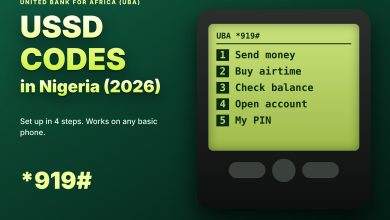
| Start (main menu) | *919# |
| Send to a UBA account | *919*3*Account Number*Amount# |
| Send to another bank | *919*4*Account Number*Amount# |
| Airtime for yourself | *919*Amount# |
| Airtime for another number | *919*Phone Number*Amount# |
| Check balance | *919*00# |
| Account opening | Menu option after *919# |
| Bills and other services | Menu options after *919# |
Capitalised words are placeholders for your real details.
How to use each one
| Code | What happens |
|---|---|
| Main menu | A menu opens. Choose the job you want |
| Transfer codes | Enter your PIN after the prompts, then wait for the alert |
| Airtime codes | Choose the network if asked, then confirm |
| Balance code | Your balance is shown or sent to you |
If a shortcut does not respond
Menu numbers can change between versions. When a shortcut fails, dial *919# alone and use the menu.
3 mistakes to avoid
◆ Adding spaces between the stars and numbers.
◆ Dialling from a number that is not linked to your account.
◆ Entering your PIN before you have checked the name or number.
Which code should you use when?
| Situation | Best choice |
|---|---|
| You want to pay a UBA customer | The UBA-account transfer code |
| You want to pay someone at another bank | The other-bank transfer code |
| Your own line is out of airtime | The self airtime code |
| A relative is out of airtime | The other-number airtime code |
| You are not sure of a shortcut | The main code, then the menu |
Before you dial any code on this list
Make sure you are using the phone number linked to your UBA account, that your signal is steady, and that you have set your 4-digit PIN. If you have never used the service, dial the main code first and finish the setup before you try a shortcut.
After every transaction
◆ Wait for the confirmation screen to finish.
◆ Keep the debit alert as your record.
◆ Check your balance if anything looked unusual.
◆ Never repeat a payment until you know the first one failed.
Keep *919# saved. Every code on this list starts there.